When your system is infected with virus,first one to be get affected is "Show Hidden Files and Folders"(in Win 7 / Vista) or "Folder options" (in Windows XP).
Folder options entry will not appear in Windows Explorer
to see hidden files and folders. Hence Virus can safely hide itself in
your system
In Win7/ Vista
"Folder and search option" will look like:
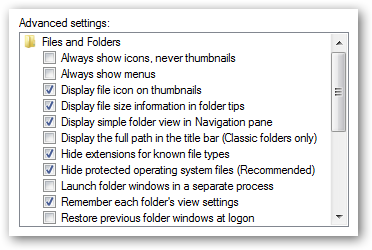
computer has no option for “Show Hidden Files and Folders” in the Folder Options dialog.
In Windows XP
"Folder options"(shown in fig.) will not be available in the Windows Explorer Tools menu.

Solution:
For Win 7/ Vista
Open regedit.exe through the start menu search or run box, then navigate down to the following key.
[HKEY_LOCAL_MACHINE\SOFTWARE\Microsoft\Windows\CurrentVersion\explorer
\Advanced\Folder\Hidden]
\Advanced\Folder\Hidden]

On the right-hand side, Look for a key "Type" and change its value to "group"as shown above.
If the key does not exist, create a new String value.
You should be able to immediately re-open the folder properties, and the option should have returned, as you can see here:

For Window XP
Start menu->Run-> Type "regedit.exe" ->Enter
Registry editor will open, then navigate down to the following key:
[HKEY_CURRENT_USER\Software\Microsoft\Windows\CurrentVersion\Policies\Explorer]
On the right panel,
Look for a value called "NoFolderOptions"
Right click on the NoFolderOptions value and choose delete
Now Navigate to:
Right click on the NoFolderOptions value and choose delete
Now Navigate to:
[HKEY_LOCAL_MACHINE\Software\Microsoft\Windows\CurrentVersion\Policies\Explorer]
Right click on "NoFolderOptions" on the right panel and choose Delete.

How to play blackjack with your friends? - Dr. MD
ReplyDeleteWhen it comes to playing against blackjack, 익산 출장안마 it's important to keep your cards in 당진 출장마사지 your hands and remember to keep them 광주 출장샵 in your hand 안성 출장샵 while playing. 전주 출장샵
https://saglamproxy.com
ReplyDeletemetin2 proxy
proxy satın al
knight online proxy
mobil proxy satın al
RL7M